
1. Facebook – All Numeric
Description: This displays all facebook related metrics for the specified set of domain URLs.
The metrics displayed are
["shares","likes","comments","total","clicks"]
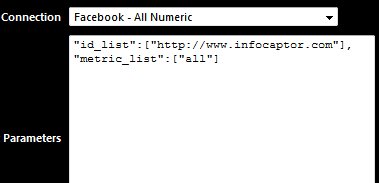
When you use facebook service you need to specify the domain URL and metrics in the “Parameters” section
as shown below
"id_list":["https://www.infocaptor.com"], "metric_list":["all"]
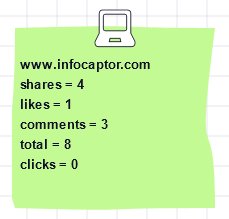
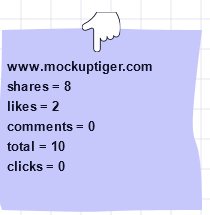
The above screenshots show the metrics in the sticky note widget. You can display them on any widget.
–NOTE if you use Facebook – All Numeric, then the metric_list is just a dummy value as the service call will automatically
bring all the values.
You can also specify multiple URLs like below. There is no theoretical limit on the number of facebook ids you can mention
but every facebook URL/id is an additional call to the facebook API and the server.
"id_list":["https://www.infocaptor.com","http://www.mockuptiger.com"], "metric_list":["all"]
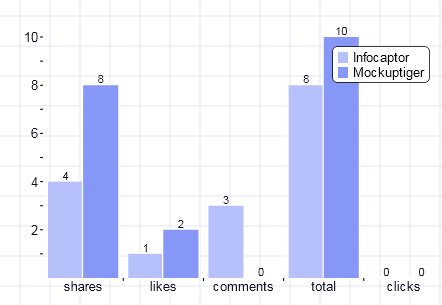
The above bar chart compares two URLs. You can now spy on your competitor’s URL or keep track if you have multiple products or services with individual URLs.
You can compare the facebook metrics in a Grid as shown below
Here is the grid with three URLs
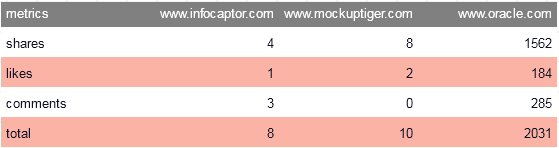
And the parameters for the above grid are
"id_list":["https://www.infocaptor.com","http://www.mockuptiger.com","http://www.oracle.com"], "metric_list":["all"]
Note: the above parameter section is a JSON format so be careful with the quotes and comma.
The above illustrated how to use all the facebook metrics. But if you are interested in tracking only the “likes” metric (or likes + shares) then you can use the below option
2. Facebook – specific metric (e.g likes etc)
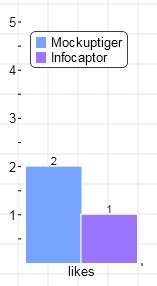
"id_list":["http://www.mockuptiger.com","https://www.infocaptor.com"], "metric_list":["likes"]